
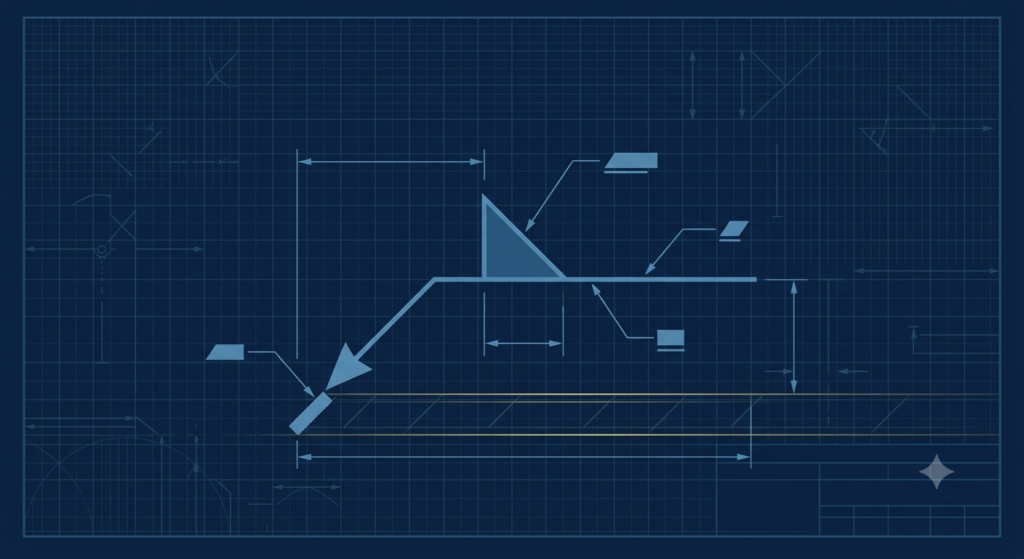
Drop a fabrication drawing on a new hire’s desk and watch what happens. They can usually handle dimensions, tolerances, and material callouts without much trouble — then they hit a welding symbol. A horizontal line, an arrow bending toward a joint, a triangle sitting above or below that line, a few numbers, and a forked tail full of letters and codes. To someone who hasn’t been taught the system, it looks like a coded message. To someone who has, it’s a complete weld specification compressed into about two square inches of paper.
This is a crash course, not a textbook chapter. The goal is simple: by the end of this guide, you should be able to look at almost any welding symbol on a fabrication drawing, an isometric, or a WPS-linked detail and read it correctly — arrow side or other side, weld type, size, length, finish, and process — in well under 30 minutes of focused reading. We’ll cover the standard, the anatomy of the symbol, the most common weld and supplementary symbols, how dimensions and the tail work, three fully worked examples, and the misreadings that actually cause rework on the shop floor.
| Need Your Welding Documentation Audit-Ready? FreeDocumentsHub.com prepares WPS/PQR packages, MTR traceability files, NDE/NDT reports, ITPs, and complete MDR data books for fabricators pursuing ASME certification and Saudi Aramco AVL registration. Visit freedocumentshub.com to discuss your documentation package. |
Why Welding Symbols Exist
Welding symbols exist because written weld instructions don’t scale. A drawing with dozens of joints can’t carry a paragraph of text at every weld without becoming unreadable, and plain language invites translation errors on multinational fabrication teams. A symbol system solves both problems: it’s compact, and it means the same thing whether the welder reading it speaks English, Hindi, Tagalog, or Arabic.
The system most fabrication drawings in the Gulf region and across the US-influenced oil and gas sector follow is AWS A2.4, Standard Symbols for Welding, Brazing, and Nondestructive Examination, published by the American Welding Society. ISO 2553 is the international equivalent used on many European-origin drawings, and the two systems share the same basic logic even though some symbol shapes differ slightly. Because most ASME Section VIII pressure vessel drawings and Saudi Aramco-aligned fabrication packages reference AWS conventions, that’s the system this guide focuses on.
One more thing worth knowing before you go further: the welding symbol on a drawing tells the welder what to build. The Welding Procedure Specification (WPS) referenced in the symbol’s tail tells the welder how to build it — process, parameters, consumables, and qualification range. Reading the symbol correctly is the first link in that chain, and it’s the link most often skipped during training.
The Anatomy of a Welding Symbol
Every welding symbol is built from the same set of parts, even though not every part appears on every symbol. Learn these seven, and the rest of this guide is just vocabulary.
- Reference line — the horizontal line that everything else attaches to. Nothing about the weld is read until you find this line first.
- Arrow — a line that drops down from one end of the reference line and points to the actual joint on the drawing. It tells you which joint the symbol belongs to.
- Basic weld symbol — the small shape (triangle, V, square, etc.) that sits directly on the reference line and tells you the weld type — fillet, groove, plug, spot, and so on.
- Symbol position (above or below the line) — this is what determines arrow side versus other side, covered in detail in the next section.
- Dimensions — numbers placed to the left and right of the weld symbol — size on the left, length and pitch on the right.
- Tail — the forked open end of the reference line, used to call out the WPS number, welding process, specification, or NDE reference.
- Supplementary symbols — extras layered on top of the basic symbol: a circle for weld-all-around, a flag for field weld, and contour/finish marks for ground or machined welds.
Once you can pick these seven elements out of a cluttered drawing, you’re no longer reading a mystery symbol — you’re reading a checklist.
Arrow Side vs. Other Side — the #1 Source of Confusion
This single rule trips up more new engineers and welders than every other part of the symbol system combined, so it’s worth isolating on its own.
The reference line has two sides: the side the symbol sits below, and the side it sits above.
- Symbol below the reference line = arrow side — the weld goes on the same side of the joint that the arrow is physically pointing to.
- Symbol above the reference line = other side — the weld goes on the opposite side of the joint from where the arrow points.
- Symbol on both sides of the line = weld both sides — two welds, one on the arrow side and one on the other side, often (but not always) identical in size and type.
A simple way to keep this straight: imagine the reference line as a fence and the arrow as a finger pointing at a specific board on that fence. “Below the fence” (arrow side) means the weld is on the near side, where the finger is pointing. “Above the fence” (other side) means flip to the far side of that same board. The arrow never moves — only the symbol’s position relative to the reference line changes which face of the joint gets the weld.
This matters more than it might seem on paper. On a butt joint between two plates of different thickness, or a T-joint where one side is structurally critical and the other isn’t, building the weld on the wrong side isn’t a cosmetic error — it’s a joint that doesn’t meet the design intent and may need to be cut out and rewelded.
The Most Common Basic Weld Symbols
These are the symbols you’ll encounter on the overwhelming majority of fabrication and piping drawings. Each one sits directly on the reference line in the arrow-side or other-side position described above.
| Weld Type | Symbol Shape | Typically Used For |
| Fillet | Right triangle, vertical leg against the reference line | T-joints, lap joints, corner joints — the most common weld on any fabrication job |
| Square Groove | Two short parallel vertical lines | Thin-wall butt joints with no edge preparation |
| V-Groove | Open “V” shape | Butt joints with both edges beveled — common on pressure vessel shells and piping |
| Bevel-Groove | Half of a “V,” one vertical side | Butt or corner joints where only one edge is beveled |
| U-Groove | Rounded, cup-shaped channel | Thick-wall butt joints where a square or V prep would need excessive filler |
| J-Groove | Half of a “U,” one vertical side | Thick-wall joints where only one edge needs the rounded prep |
| Plug / Slot | Rectangle | Joining overlapping plates through a drilled or punched hole/slot |
| Spot / Projection | Circle | Resistance or projection welds on sheet metal and structural attachments |
| Seam | Circle with reference-line tails through it | Continuous resistance welds along a seam, often on tanks and ducting |
| Backing | Rectangle below the reference line | Calls out a backing strip or backing weld behind a groove weld |
| Surfacing | Series of shallow curved lines (like waves) | Build-up or cladding weld applied to a surface rather than a joint |
If you only memorize one row from this table, make it the fillet weld — the simple right-triangle symbol accounts for the majority of welds on most structural and piping drawings, and it’s the symbol most combined with the supplementary marks covered next.
Supplementary Symbols — the Extra Layer of Instruction
Supplementary symbols ride alongside the basic weld symbol and add instructions that change how, where, or how much the weld gets finished.
- Weld-all-around — a circle drawn at the bend where the arrow meets the reference line. It means the weld continues around the entire perimeter of the joint, not just at the point the arrow happens to touch.
- Field weld — a small flag drawn at the same bend point, pointing back toward the tail. It tells the shop this joint is NOT welded in the fabrication shop — it’s completed later, on site, during erection.
- Contour — flush — a straight line added on top of the basic symbol; the finished weld face should be flat, level with the surrounding material.
- Contour — convex — a curved (bulging outward) line added on top of the basic symbol; the finished weld face should have a slight outward bulge.
- Contour — concave — a curved (caving inward) line; the finished weld face should be slightly dished, common on fillet welds in fatigue-sensitive joints.
A letter code next to the contour symbol specifies how that finish is achieved. The common ones: C — chipping, G — grinding, M — machining, R — rolling, H — hammering, and P — peening. No letter generally means the contour is left as-welded.
Reading the Dimensions
Once you can identify the weld type and which side it belongs on, the numbers around the symbol tell you exactly how big to make it.
- Size (left of the symbol) — for a fillet weld, this is the leg length (e.g., 6 means a 6 mm leg). For a groove weld, it’s usually the depth of the bevel or groove preparation.
- Length (right of the symbol) — how long the weld run is. If no length is given, the weld runs the full length of the joint.
- Pitch (right of the symbol, after the length) — for intermittent (stitch) welds, written as length-pitch, such as 50-150. That means a 50 mm weld segment is repeated every 150 mm, center to center.
- Root opening — shown as a small number inside the mouth of a groove symbol (such as a V-groove); it specifies the gap left between the two parts before welding.
- Included angle — the angle value placed at the open mouth of a groove symbol, specifying how wide the bevel preparation is (commonly 60° for a V-groove on pressure vessel shells).
A practical habit worth building: read dimensions left-to-right exactly like you’d read a sentence — size first, then length, then pitch. Reading them out of order is one of the more common ways an otherwise correct symbol gets misinterpreted.
The Tail — Where the Real Specification Lives
The tail is the forked, open end of the reference line, and on a documentation-heavy job it often carries more weight than the symbol itself. This is where the drawing connects directly to your quality system.
- WPS reference — the specific Welding Procedure Specification number that governs this joint, linking the drawing directly to a qualified procedure.
- Welding process — a process designation such as SMAW, GTAW, GMAW, FCAW, or SAW, telling the shop which process (and therefore which WPS family) applies.
- NDE method reference — often paired with AWS A2.4’s supplementary nondestructive examination symbols, flagging that this joint requires RT, UT, MT, or PT and at what extent.
- Specification reference — a code or client specification number, such as an ASME Section IX paragraph or a project-specific welding specification.
Many shop-floor sketches leave the tail blank because the process is already fixed elsewhere on the drawing or in a general note. For Aramco AVL-grade documentation and ASME audit packages, though, reviewers increasingly expect the tail to be complete — a blank tail on a critical joint is one of the first things an auditor circles during a drawing-to-WPS traceability check.
Worked Examples — Reading Three Real Symbols
Theory only sticks once you’ve walked through it on an actual symbol. Here are three realistic examples, read the same way you’d read them off a drawing.
Example 1: Fillet Weld, Arrow Side, All Around
Symbol reads: a right-triangle fillet symbol below the reference line, with “6” to its left, “50-150” to its right, and a circle at the bend where the arrow meets the line.
- Weld type: fillet (triangle on the line).
- Side: below the line → arrow side — the weld goes on the joint face the arrow is pointing at.
- Size: 6 mm leg length.
- Length / pitch: 50-150 → a 50 mm weld segment every 150 mm, center to center (an intermittent stitch weld).
- Supplementary: the circle means weld-all-around — so despite the intermittent callout, the stitch pattern wraps the full perimeter of the joint, not just the section the arrow touches.
Example 2: V-Groove, Both Sides, Ground Flush
Symbol reads: a “V” shape both above and below the reference line, “60°” at the mouth of the V, “3” inside the root, a flat line (flush contour) with a “G” above the upper V, and “GTAW root / SMAW fill, WPS-014” written in the tail.
- Weld type: V-groove.
- Side: symbol appears on both sides of the line → weld both sides of the joint.
- Included angle: 60° bevel preparation at the groove mouth.
- Root opening: 3 mm gap left between the plates before welding.
- Finish: flush contour, achieved by grinding (G), on at least the side carrying the contour mark.
- Tail: ties the joint to WPS-014, with GTAW specified for the root pass and SMAW for fill — a very common combination on pressure vessel shell seams.
Example 3: Field-Welded Spot Weld
Symbol reads: a circle (spot weld) on the reference line, “8” to its left (weld diameter in mm), “100” to its right (pitch), and a field-weld flag at the bend where the arrow meets the line.
- Weld type: spot weld (circle on the line).
- Size: 8 mm weld diameter.
- Pitch: 100 mm center-to-center spacing between spot welds.
- Field weld flag: this joint is not welded in the shop — it’s scheduled for erection on site, which changes scheduling, access planning, and who’s responsible for the weld record.
Common Misreadings That Cause Rework
Most welding-symbol mistakes aren’t exotic — they’re the same handful of misreadings repeating across different shops and different drawings.
| Watch for these on every drawing review: Arrow side / other side reversal — the single most expensive mistake on this list. A weld built on the wrong face of a joint often means cutting it out and starting over.Missed weld-all-around circle — welding only at the arrow point instead of the full perimeter, leaving an incomplete joint that fails inspection.Misreading the pitch notation — confusing length-pitch order, or treating a continuous weld callout as intermittent (or the reverse).Ignoring the tail — using the shop’s default process instead of the WPS actually referenced, which breaks drawing-to-procedure traceability during an audit.Missing the field-weld flag — completing a joint in the shop that was meant to be left open for site erection, sometimes forcing it to be cut apart and rejoined later. |
Why This Matters for ASME and Aramco AVL Documentation
Welding symbols aren’t an isolated drafting convention — they’re the front door to your entire weld traceability chain. Every WPS/PQR package, every NDE report, and every entry in an MDR data book ultimately traces back to a specific symbol on a specific drawing. An auditor reviewing a fabricator for ASME certification or Saudi Aramco AVL registration will routinely pick a joint at random, follow its symbol to the referenced WPS, and confirm the welder, process, and NDE records all line up with what the symbol called for.
That’s why getting comfortable reading symbols isn’t just a welder or drafter skill — it’s a prerequisite for anyone preparing or reviewing ITPs, MTR traceability files, or full data books. A documentation package built on a misread symbol is a documentation package with a traceability gap, and traceability gaps are exactly what AVL and ASME audits are designed to find.
| Building Your QC Manual, WPS/PQR Package, or AVL Submission? FreeDocumentsHub.com works with fabrication workshops across the Gulf region and the US on ASME Quality Control Manuals, WPS/PQR development, MTR traceability, NDE/NDT reporting, ITPs, and complete MDR data books — built to withstand a real audit, not just look complete on paper. Get in touch through freedocumentshub.com to scope your documentation package. |
Conclusion
Thirty minutes is genuinely enough to go from “welding symbols look like a coded message” to reading them with confidence — provided you work through them in the right order. Find the reference line. Follow the arrow. Check whether the symbol sits above or below the line. Read the dimensions left to right. Check the tail. That sequence works on almost every symbol you’ll encounter on a real fabrication drawing.
The fastest way to make it stick is to practice on drawings you already have on hand. Pull up three or four welding symbols from a recent job, run each one through the five-step sequence above, and check your reading against the WPS it references. Within a handful of real symbols, the “coded message” starts reading like plain English.