
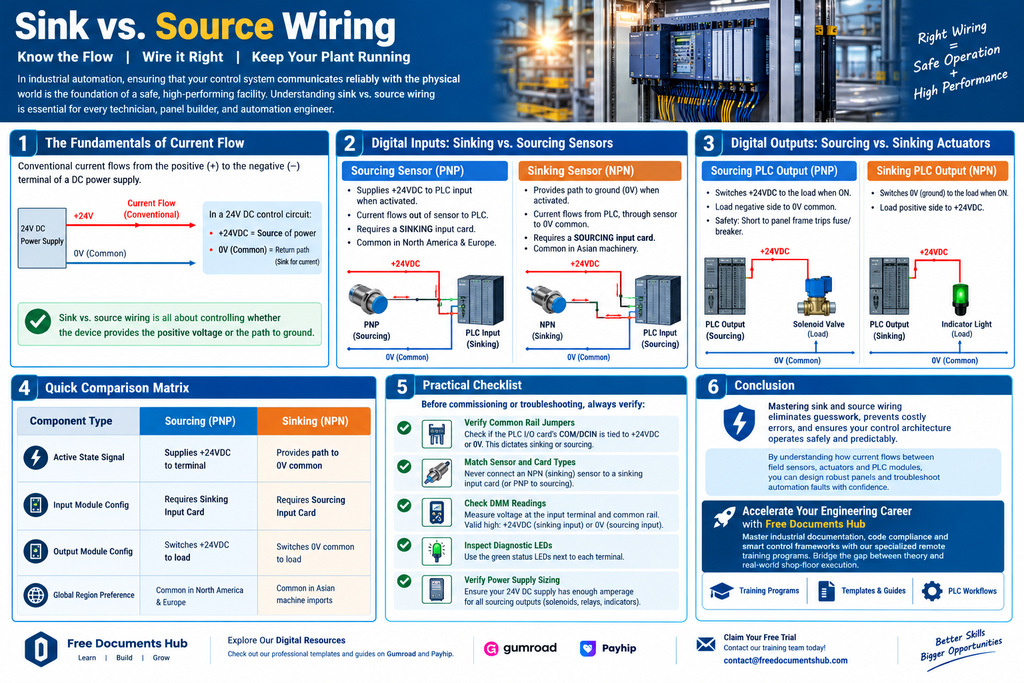
In industrial automation, ensuring that your control system communicates reliably with the physical world is the foundation of a safe, high-performing facility. Whether you are building an automated assembly line, upgrading a chemical processing plant, or troubleshooting a control panel, understanding how power flows through your system is critical.
At the very heart of this hardware interface lies a fundamental concept that every technician, panel builder, and automation engineer must master: Sink vs. Source wiring.
Confusing sinking and sourcing inputs or outputs can lead to non-functioning hardware, damaged PLC modules, or hazardous safety failures. In this comprehensive guide, we will break down the electronics behind sinking and sourcing, examine how digital inputs and outputs interact with PLCs, and provide safe wiring best practices to keep your plant floor running smoothly.
1. The Fundamentals of Current Flow: Conventional Current vs. Electron Flow
Before diving into PLC terminals, let’s clarify the terminology. In industrial electronics, we use conventional current flow, meaning current flows from the positive terminal ($+$) to the negative terminal ($-$) of a DC power supply.
In a standard 24V DC industrial control circuit:
- The Positive DC Rail ($+24\text{VDC}$) acts as the source of power.
- The Negative DC Rail ($0\text{V}$ / Common) acts as the return path or sink for current.
Everything in sink and source wiring revolves around a simple rule of thumb: controlling whether the input/output device provides the positive voltage or provides the path to ground.
2. Decoding PLC Digital Inputs: Sinking vs. Sourcing Sensors
Digital inputs tell the PLC the state of field devices—such as pushbuttons, limit switches, photoelectric sensors, and proximity switches. The wiring configuration depends entirely on whether the sensor or the PLC module supplies the switching voltage.
What is a Sourcing Sensor (PNP)?
- Definition: A sourcing device supplies (sources) positive voltage ($+24\text{VDC}$) to the PLC input terminal when activated.
- Current Direction: Current flows out of the sensor’s signal wire and into the PLC input terminal.
- PLC Module Requirement: To accept a signal from a PNP (sourcing) sensor, the PLC input module must be configured as sinking (it provides the internal path to $0\text{V}$ common).
- Industry Standard: PNP (sourcing) sensors are widely preferred in North America and many European heavy industries due to safety and troubleshooting conventions (short circuits to ground blow fuses rather than falsely energizing inputs).
What is a Sinking Sensor (NPN)?
- Definition: A sinking device provides a path to ground ($0\text{V}$ common) when activated.
- Current Direction: Current flows out of the PLC input terminal, through the sensor, and into the $0\text{V}$ common rail.
- PLC Module Requirement: To accept a signal from an NPN (sinking) sensor, the PLC input module must be configured as sourcing (it provides the internal $+24\text{VDC}$ supply to the input terminal).
- Industry Standard: Commonly found in Asian machinery and semiconductor manufacturing equipment.
3. Decoding PLC Digital Outputs: Sinking vs. Sourcing Actuators
Digital outputs allow the PLC to control field devices—such as solenoid valves, indicator pilot lights, motor starter relays, and horns.
Sourcing PLC Outputs (PNP Output Cards)
- When a sourcing output channel turns ON, the PLC internal switch closes and applies $+24\text{VDC}$ to the output terminal.
- The connected load (e.g., a solenoid valve coil) must have its negative side permanently wired to the $0\text{V}$ common rail.
- Safety Note: If the positive output wire accidentally chafes and touches bare metal panel framing, it will create a dead short, immediately tripping the power supply fuse or circuit breaker.
Sinking PLC Outputs (NPN Output Cards)
- When a sinking output channel turns ON, the PLC internal switch closes and connects the output terminal to $0\text{V}$ (Ground/Common).
- The connected load must have its positive side permanently wired to $+24\text{VDC}$.
- Current flows from the $+24\text{VDC}$ rail, through the load, into the PLC output terminal, and to ground.
4. Quick Comparison Matrix: Inputs and Outputs
| Component Type | Sourcing (PNP) | Sinking (NPN) |
| Active State Signal | Supplies $+24\text{VDC}$ to terminal | Provides path to $0\text{V}$ common |
| Input Module Config | Requires Sinking Input Card | Requires Sourcing Input Card |
| Output Module Config | Switches $+24\text{VDC}$ to load | Switches $0\text{V}$ common to load |
| Global Region Preference | Common in North America & Europe | Common in Asian machine imports |
5. Practical Checklist: Verifying PLC Wiring Safely
Before commissioning a control panel or troubleshooting a dead input/output point, always run through this safety and verification matrix:
- [ ] Verify Common Rail Jumpers: Check whether the PLC I/O card’s common terminal (COM / DCIN) is tied to $+24\text{VDC}$ or $0\text{V}$ common. This dictates whether the card expects sinking or sourcing field devices.
- [ ] Match Sensor and Card Types: Never connect an NPN (sinking) sensor directly to a sinking PLC input card; neither device will provide the necessary voltage potential to register a signal.
- [ ] Check Digital Multimeter Readings: Measure voltage across the PLC input terminal and common rail with the device activated. A valid high state should read close to $+24\text{VDC}$ (for sinking input cards) or $0\text{V}$ reference (for sourcing input cards).
- [ ] Inspect Diagnostic LEDs: Most modern PLC I/O modules feature green status LEDs next to each terminal. Use these as your first line of defense during checkout.
- [ ] Verify Power Supply Sizing: Ensure your 24V DC power supply has adequate amperage headroom to handle simultaneous actuation of all sourcing outputs (solenoids, relays, and indicators).
6. Conclusion: Mastering Safety in Industrial Wiring
Mastering sink and source wiring eliminates guesswork on the plant floor, prevents costly wiring errors, and ensures your control architecture operates safely and predictably. By understanding how current flows between field sensors, actuators, and PLC modules, you can design robust panels and troubleshoot automation faults with absolute confidence.
🚀 Accelerate Your Engineering Career with Free Documents Hub
Knowing how to wire and troubleshoot automation systems is only half the battle; mastering modern industrial documentation, code compliance, and smart control frameworks is what sets top-tier engineers apart.
At Free Documents Hub, we offer specialized remote training programs covering industrial engineering design, PLC programming workflows, and technical documentation. Our programs are specifically designed to bridge the gap between academic theory and real-world shop-floor execution.
🛠️ Ready to elevate your technical credentials?